If you have no sound on your Apple iPhone 3 / 3GS / 4 / 4S / 5 / 5S / 5C/ 6/ 6Plus/ iPhone 6s/ 6s Plus/ iPhone 7, 8, 8Plus and the iPhone X, iPhone Xs volume bar, it is unbelievably frustrating as you most probably already know.
I have been looking for cures over the web as there are many out there. Below you will find a list of all these including the one that worked for me. Also, this list is in chronological order of what seems to be most successful. It is a process of elimination but it has to be done.
The symptoms of iPhone no sound Problem/ Issues include:
– iPhone will ring but speaker will not work for anything else.
– iPhone no sound at all for calls, apps, music, etc
– iPhone no sound as stuck in headphone mode
Follow these steps and hopefully, your iPhone will be back to its prior glory.
iPhone No Sound – How To Fix & Tutorials 2020
Step 1 – Check Silent Mode Switch

Loud/ Silent switch on the exterior of the iPhone is switched to the silent mode which is orange. If so, flick the other way to loud mode. This is a step that so many people miss, but it is the simplest! Also once you have flicked the silent mode off, ensure your volume is turned up by pressing the volume buttons on the side.
Step 2 – Restart Your iPhone

To restart the iPhone, hold the power switch and home button together for 10 seconds. This will restart your iPhone, you will not lose any media, contacts, data, etc. If there is a temporary glitch on the iPhone this will eliminate that glitch. Also if there is a glitch this may help terminate a temporary glitch.
If you have an iPhone X or newer, you can simply restart the device by pressing and holding both the side button and one of the volume buttons. Once done, you’ll then be promoted to restart the iPhone. When off, click the side button to turn on again.
Step 3 – Reset iPhone Settings
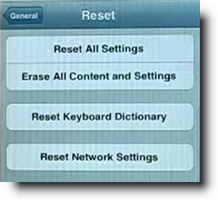
Reset iPhone. Go to Settings> General> Reset> Reset all settings. Make sure to backup your iPhone to the cloud / iTunes as this will wipe your media, music, and apps although photos will be left on the iPhone. This is a follow on to step 2 and another way you will be able to eliminate the glitch on the iPhone.
Step 4 – Press Corner Of iPhone

This one is a bit weird but it worked for me for a while and has worked successfully for other people. Squeeze the bottom right hand corner of the phone above where the speaker is.
The left Side is a mic, not a speaker, so don’t worry about that side. Hold that grip for about 20 seconds. This is done as the connector may be loose and had to be repositioned correctly. Yes, strange but most of these solutions are!
Step 5 – Clean Your iPhone

Use a tooth brush to clean the docking area where you charge your iPhone. With dirt, dust, grime, and so on it, may block the connectors working correctly and makes the phone think it is on a music dock. When you do this do it gently and get the bristles into there good.
Also if you use rubbing alcohol or acetone it will help get all the extra dirt out. As these products evaporate it will not do damage to the connectors. Do not use mineral terps when cleaning as it is oil based and will not dry!! This seems to be one of the most successful solutions. To avoid this happening in the future, its best to have a case that avoids dust and grime getting in.
Step 6 – Insert Headphones

Get your headphones and insert them into the headphone jack and then quickly pull them out. Continue this for a couple of minutes as sometimes it gets stuck in headphone mode so this normally undoes that. Also this may remove any dust or grime that may have been lodged in there.
You can also watch this video below which has a full list of fixes listed in this tutorial plus a few more that will restore sound to your iPhone!
Step 7 – Restore Your iPhone

Restore your iPhone on iTunes. Click on your iPhone icon when plugged into iTunes and go to restore. If you do this make sure your iPhone is backed up as YOU will loose all data, media, contacts, pics, and so on. This puts your iPhone back to factory settings.
This is similar to step 3 as it is a full reset of the device, this should help eliminate any glitch that have have come out in a recent update such as iOS7 or iOS8. Also when doing this step check for updates.
Step 8 – Jailbreak iPhone
Jailbreak your iPhone to find the file directories that are causing the fault. By doing this you are deleting the file that is making the iPhone think it is on a dock. You will still be able to use a music docking station etc. If you have a jail broken iPhone or willing to do it then this will be the best option for you. Very simple video and easy to follow, to jailbreak follow my simple tutorial.
Step 9 – Dry iPhone

This worked for me!! The squeezing step worked for me for a small amount of time. Not much else worked so thought I would try my own cure…. An old hair dryer!! Turn on low heat and hover over the speaker outlet for about 5 minutes.
I also did the headphone jack as well. There must of been some residual moisture build up which the hair dryer eliminated. The speaker was sputtering on and off during this time but finally came to life :). If you don’t have a hair dryer, you can also put your iPhone in dry rice while turned off. This can suck up all that unwanted moisture. Best to leave in rice for at lease 12 hours.
Step 10 – Hardware Problem

It may be a hardware problem and simply need to get a replacement through your provider who may offer insurance if chosen or apple support. This no sound and speaker is getting more known know by Apple there is a good chance you may get a replacement or a hardware fix.
Step 11 – Ultimate Destruction
If iPhone still has no sound there is always ultimate elimination… Not endorsed. See below….
**** UPDATE **** 18/03/20
Thank you everyone for such an overwhelming response! Also to those that have put up there own solutions that have worked for there iPhones. Initially when I created this website I did not envision the large response of people with the same issues. So here are some new solutions and steps that are popular on the comment feed.
iPhone No Sound Solution Step 12

As dirt and grime like to build up in the charging connectors of the iPhone it is necessary to clean it out. Similar to the step with cleaning it with a toothbrush you will be using compressed air instead. The best and easiest way you can do this is to blow air out your mouth with a good force into where the iPhone would get charged.
Do this for 1 minute to insure that it removes any dust or dirt particles. After that, plug and unplug your charger into the slot about 5-10 times.
iPhone No Sound Solution Step 13

This is similar to the step above but you will be cleaning out the headphone jack on the iPhone instead of the charging connectors. As above blow into the headphone jack for about 30 seconds to 1 minute, this should vanish any dust or dirt that is lodged in there.
Once that is done insert a ear bud/ q tip into the headphone jack and twist for about 30 seconds. That should dislodge any other dirt or grime that the blowing process may have missed.
If your iPhone X is not turning on, then you should check out my full guide here.
iPhone No Sound Solution Step 14

There have been more than a dozen comments saying that bluetooth may be interfering with the sound on the iPhone. One good method is to insure that your iPhone is not connected to any bluetooth device as it may be playing sound thru that device. Also another successful step that has been recommended is to turn off bluetooth and then turn on again.
iPhone Has No Sound Step 15
As a continuation to step 5, there have also been several reports of people who have also cleaned their iPhone with a wooden toothpick.
While a toothbrush works quite well, there is typically quite a lot of dirt still stuck in the charing port which can only be gotten out with a pointy object. Just be careful not todo any damage to your iPhone charge port. This seems to work well with older iPhone 4 and also the new iPhone 8 and iPhone X.
These are just some of the steps I have found and come up with which have shown success for iPhones with no sound.
Lisa says
#3 worked for me
Richard says
I can’t believe #5 worked for me. I had hay stuck up there. Thank you.
John says
Number 4 surprisingly worked.
sparky says
Number one worked for me.Thanks
Sora says
For me, I connected the charger (mobile but its the same as direct) and it Worked
Kateland says
None of them worked for me stupid phone
Julianna says
I can’t believe #5 work for me thank you anyway!!
sound proof coating says
So identifying the source of the sound will help you achieve
your objective, and also save you money in the
long run. If you are in a college dorm room the walls
may even be concrete blocks. With enough mast, even large boats can propel to far places.
helmet safety for kids says
Although a bit costly, this is the safest and the most sensible thing to do.
A good All terrain vehicle or UTV along with Independent Rear Suspension can use broad stance offsets,
but they’re only available in a few measurements.
Supervise riders younger than 16; ATVs are not toys.
ADAM says
Amazing i tried all the steps and the one that i found to be a bit strange was step number 4!!!! thats right…. after 10 seconds my sound was blaring lol.. thank you so much
carl andrei says
tnx 🙂 its work
Dean says
Hello EVERYONE with this on going issue with sound problems!
After following, reading, trying every single thing mentioned in these community discussions for months upon months, the mystery has been once and for all solved. So YES! There is a solution to this issue, but only ONE! You have to replace the charging port! It only cost me $6.95 (including tools and free shipping), three days for delivery, and 15 minutes to install. I went to Amazon. It’s actually pretty easy as long as you are careful. You can find video instructions on YouTube. Like I said I literally tried everything everyone (God bless you all), offered as solutions but the problem ALWAYS came back. Please hear me that this will be the ONLY THING that will work. I don’t understand why Apple wouldn’t address this or offer this, if any, advice to anyone to save their customers from all this! (Some of these community discussions go back a couple years). The next community discussion should be about Apple kicking in to pay their obviously loyal customers back for this. Good luck to all!!
easy gift ideas says
Even the name Sweetest Day suggests that you choose a gift that has an aroma,
bouquet, fragrance or scent as some of the sweetest day gift ideas for girlfriend.
So, your 60th birthday gifts should be able to convey this special
affection as well. To learn more about gift ideas, visit our website at My – Reviews
– Now.
Don says
Had the no sound problem last year. Took the phone back to apple. The battery had swollen on the inside affecting the sound connection piece. Thankfully I got a new phone out of it
eM says
step 1. mandatory
step 2. play any music in itunes… once you hear sound in built in speakers.. you are good…
that fixed my silent iphone…
Coco says
just tried all steps, no luck. im thinking of installing a replacement speaker. anyone tried that and was successful?
AbelM. says
Followed eM advise & worked for me – thanx a mil
AbelM. says
pluz i put “do not disturb” to “allow calls from everyone” so maybe a combination of both…
mahrinnaveed says
i have iphone5s i PUT FOR CHARGING MY PHONE THEN AFTER CHARGING MY HOME BUTTON NOT WORKING NO VOLUM AND NOT CHARGING WHAT I DO I USE THESE STPS ALSO BUT NO RESULT
Lovella Adriano says
Thank you! Number 3 worked for me!
George Lessard says
Thanks… A non-Apple charging connect was at fault.. but following your procedures got me to the point of eliminating all else… Thanks again.
how to unlock iphone 4s globe locked says
Pretty! This was a really wonderful article. Many thanks for supplying this info.
Eve says
Thanks!! Answered my question and it was a simple fix. Would never have found the darn organge button that got tweaked.
Amy says
Number 9 worked for me, for now anyways.
Awesome! Thanks
Haley says
Thank you!!!! Number 4 worked for me the best
Sandee says
I accidently dropped my phone in a vary shallow water bath. It was in there for only a second. I immediately dried if off but later that evening, the sound for videos did not play. Phone sound and music sound worked. I found this article and amazingly no. 4 worked.
Grateful.
Lori says
I did #2 and 4 !! Worked for me !! YAY
Sheila says
Thanks! The toothbrush truck worked!!
Gin says
I spilled water on the counter near my iPhone, but didn’t think it was splashed. But some moisture must have gotten into the headphone port, and it became stuck in headphone mode. Not sure if it was solution #6 or #9, or both, but something worked. Thanks!!!
Shelby says
I tried most of them and in about 5 mins mine started working normally again! Thank you so much omg!
Kathy says
#5 worked for me. Thank you!
Rebecca says
Number 4 worked for me instantly. Thank you so so so much!
John brewster says
I tried everything suggested, but still sound was intermittent and kept going off after re starting the phone over and over again.
I have however found my solution. Not sure if it applies to anyone else. I doubled pressed the home button and swiped up closing all applications. As soon as I closed the text messages app the sound came back. Every time a text comes in I lose the sound again, so this was my problem.
I hope this helps anyone else.
warmice says
Used a toothbrush to clean the charging port and earphone port…works brilliantly now!!!! Thank you!!!!!!!!!
zulfadli says
hey , bro i follow the step using the vid you post here
it works bro thanks a lottt , i really get blurred
with this prob luckly i’ve jailbrake my phone and already install i file
thanks again bro..problem solved
mike says
STEP #1 was all I needed! LOL!
Tracey says
I had the same problem and I tried all suggestions with no success. So I played and damn. Problem fixed. Go into Phone then contacts then check the ringtone and Text tone settings. My problem was the Text tone setting was set to None. I selected a tone and problem fixed.
John says
New fix – under settings, sounds, turn off change with buttons.
Jerry says
I tried the cleaning, blowing with air and several other fixes and nothing worked. In looking for a fix, I kept seeing references about the docking coupler and comments about being “stuck in docking mode”. All I did was attach my IPhone 4S to my docking station and hit play. It worked fine – then I hitpause and removed from the docking station and it worked great but after about twenty minutes of play it quit again. I repeated the process and it worked again. Any guesses as to why it is intermittent?
Anonymous says
Id like to add, this work for me in a while, if you stuck only at games and music but you can hear ringtones, just go to settig > sound then move the ring sound bar to loud while press the volume button on your phone, if your lucky then the volume bar will pop up again and will works perfectly fine